


Advanced Search

sip24.pw

Active Carder
Joined
04.05.26
Messages
39
Reaction score
7
Points
8
SIP24.cc is Back Online

SIP24 is officially back up and running.

If you're looking for a stable SIP solution with secure communication and reliable CallerID presentation, the service is live again and accepting users via invite.

Key Features:
• TLS/SRTP encryption enabled by default
• Premium CLI routing for consistent CallerID delivery
• Real-time prepaid billing
• No call logs or IP tracking
• Works on PC, mobile, and tablets
• Voice pitch shift commands available

Infrastructure:
• Europe (DE) – EU routing
• USA (US) – North America trunks
• Asia (HK) – APAC coverage

All gateways currently online.

Basic Commands:
• *8080* [Number] – Change CallerID
• *8088* [CID] * [Dest] – One-time setup
• *43 – Echo test / latency check
• *9991 / *9992 – Plan switching

Notes:
• RU / UA / KZ destinations are blocked
• Flooding is not allowed

Access:
Registration is invite-only. You’ll need to contact their Telegram bot to generate a key.

More info and SIP configuration details are available directly on their site.

Status: Online
 

sip24.pw

Active Carder
Joined
04.05.26
Messages
39
Reaction score
7
Points
8
Scam don't fall for it.
Scam? That’s the best you’ve got?


You made a fresh account today, dropped a one-line accusation, and thought that counts as “research”? If you can’t even test a SIP trunk or run a basic echo check (*43), maybe this section isn’t for you.


Service is live, routes are working, gateways are up. Anyone who actually knows what they’re doing can verify in under 2 minutes instead of posting empty noise.


If you had a failed config, say that. If you don’t understand how to authenticate or route properly, say that too. But throwing “scam” with zero proof just makes you look clueless.


Next time, come with logs or don’t come at all.
 

Brosys

Carding Novice
Joined
06.05.26
Messages
10
Reaction score
4
Points
3
The reason i said scam because i did a deposit on the account it wasn't reflected yet its been more than 24hrs and i even tried to reach you on TG uploading the screenshots as well!
 

sip24.pw

Active Carder
Joined
04.05.26
Messages
39
Reaction score
7
Points
8
Interesting how the story changed from “scam don’t fall for it” to “my deposit is pending.”

Deposits are processed after blockchain confirmations and manual fraud screening on certain transactions. Sending screenshots on Telegram 5 minutes after funding doesn’t magically bypass that process.

Also, calling a service a scam publicly before even opening a proper support case is a strange way to ask for help.

If the transaction was actually sent, provide the TXID to support and it’ll be checked. If there’s an issue, it gets resolved. That’s how real services operate.
 

sip24.pw

Active Carder
Joined
04.05.26
Messages
39
Reaction score
7
Points
8
SIP24.cc is Back Online

SIP24 is officially back up and running.

If you're looking for a stable SIP solution with secure communication and reliable CallerID presentation, the service is live again and accepting users via invite.

Key Features:
• TLS/SRTP encryption enabled by default
• Premium CLI routing for consistent CallerID delivery
• Real-time prepaid billing
• No call logs or IP tracking
• Works on PC, mobile, and tablets
• Voice pitch shift commands available

Infrastructure:
• Europe (DE) – EU routing
• USA (US) – North America trunks
• Asia (HK) – APAC coverage

All gateways currently online.

Basic Commands:
• *8080* [Number] – Change CallerID
• *8088* [CID] * [Dest] – One-time setup
• *43 – Echo test / latency check
• *9991 / *9992 – Plan switching

Notes:
• RU / UA / KZ destinations are blocked
• Flooding is not allowed

Access:
Registration is invite-only. You’ll need to contact their Telegram bot to generate a key.

More info and SIP configuration details are available directly on their site.

Status: Online
 

sip24.pw

Active Carder
Joined
04.05.26
Messages
39
Reaction score
7
Points
8
You don't have to trust us.

The system is fully automated. Support agents cannot manually credit balances, debit balances, or mark deposits as paid. If a payment is received and matched correctly, it credits automatically.

Thousands of deposits have been processed through the same gateway. Every now and then someone claims a deposit wasn't credited, but once the invoice, payment address, account ID and transaction details are checked, there's usually more to the story than a one-line forum comment.

If you want to test the service, test it. If not, that's completely fine too.
 

sip24.pw

Active Carder
Joined
04.05.26
Messages
39
Reaction score
7
Points
8

SIP24 Network Status​

All SIP24 infrastructure is currently operating normally across all regions.

Built for users who need stable SIP connectivity, reliable CallerID presentation, and encrypted voice communications without unnecessary complexity.

Network Features​

  • TLS/SRTP encryption available
  • Premium CLI routing
  • Real-time prepaid billing
  • No call recording
  • No activity logging
  • Compatible with desktop and mobile SIP clients
  • Voice pitch adjustment functions supported

Active Infrastructure​

🇩🇪 Germany — European routing

🇺🇸 United States — North American routing

🇭🇰 Hong Kong — Asia-Pacific routing

All gateways and routing clusters are currently online.

Common Service Commands​

*8080*[Number] — Set CallerID

*8088*[CID]*[Destination] — One-time route setup

*43 — Echo / latency test

*9991 / *9992 — Plan switching

Network Policy​

  • RU / UA / KZ destinations unavailable
  • Traffic flooding and abuse are prohibited

Access​

Accounts are issued through invitation keys generated by the Telegram provisioning bot.

Current Network Status: OPERATIONAL
 

Ghotsem91

Carding Novice
Joined
09.06.26
Messages
13
Reaction score
1
Points
3
Do you guys have signal or telegram in USA I got btc ready
 

gidd

Carding Novice
Joined
08.07.26
Messages
6
Reaction score
0
Points
1
Interesting how the story changed from “scam don’t fall for it” to “my deposit is pending.”

Deposits are processed after blockchain confirmations and manual fraud screening on certain transactions. Sending screenshots on Telegram 5 minutes after funding doesn’t magically bypass that process.

Also, calling a service a scam publicly before even opening a proper support case is a strange way to ask for help.

If the transaction was actually sent, provide the TXID to support and it’ll be checked. If there’s an issue, it gets resolved. That’s how real services operate.
how now so it can take awhole day
 

Labrador01

Active Carder
Joined
20.06.26
Messages
46
Reaction score
6
Points
8
hey bro, im using bitcall sip trunk but they are very unreliable, my cli number only works about 60% of the time, call termination is the UK. can you help out on this issue if u jump to your services?
Scam? That’s the best you’ve got?


You made a fresh account today, dropped a one-line accusation, and thought that counts as “research”? If you can’t even test a SIP trunk or run a basic echo check (*43), maybe this section isn’t for you.


Service is live, routes are working, gateways are up. Anyone who actually knows what they’re doing can verify in under 2 minutes instead of posting empty noise.


If you had a failed config, say that. If you don’t understand how to authenticate or route properly, say that too. But throwing “scam” with zero proof just makes you look clueless.


Next time, come with logs or don’t come at all.
 

sip24.pw

Active Carder
Joined
04.05.26
Messages
39
Reaction score
7
Points
8
germany update

для germany установка callerid временно недоступна

пока звонки будут идти со случайного немецкого toll free или business landline номера

на данный момент это лучшее решение которое можем предложить и немногие провайдеры вообще могут обеспечить такой вариант

спасибо за поддержку продолжаем работать над callerid

germany update

callerid is temporarily unavailable for germany

for now calls will be placed with a random german toll free or business landline number

this is the best solution we can provide at the moment and only a few providers are able to offer this

thanks for your support we continue working on full callerid support
 

carder450

Carding Novice
Joined
12.08.26
Messages
6
Reaction score
0
Points
1
hey, when will be custom caller id be available again for germany? what is the estimated time? i am long time user of sip24

best regards.
 

sip24.pw

Active Carder
Joined
04.05.26
Messages
39
Reaction score
7
Points
8
SIP24 infrastructure update and operational status.

Features and configuration syntax:

[*] Caller ID setup: Dial *8080*<number>. A 603 Declined response confirms the caller ID is set.
[*] Verify active caller ID: Dial *9000.
[*] In-call audio playback: *7002[number] to inject pre-recorded audio or intros into an active call.
[*] Blind transfer: ##[number] for transfer without holding (supported on webphone and standard SIP clients).
[*] Local recording: *7301 to start, *7300 to stop (client-side recording, nothing passes through our servers).
[*] Secure media: DTLS/SRTP enabled by default (*7443 to verify).

Active routes (optimized):
🇫🇷 FR
🇺🇸 US
BELGIUM
🇧🇷 BR
🇪🇸ES

Germany (DE) update:
Custom caller ID selection is temporarily unavailable for Germany. Calls currently route via random German toll-free or business landline numbers while route engineering continues.

Accounts affected by recent optimization adjustments have been credited with 10 EUR.


Request current payment details directly inside the user panel before funding.

Access : SIP24.CC​
 

sip24.pw

Active Carder
Joined
04.05.26
Messages
39
Reaction score
7
Points
8
📞 SIP24.CC: Complete Zoiper Setup & Custom Caller ID Guide 📞

SIP24.CC provides direct access to high-performance voice infrastructure with advanced caller ID spoofing and clean routing. Forget the public garbage apps and broken Telegram bots — stable operations require proper server configuration and reliable routing lines.

This guide walks you through connecting your SIP24 trunk to Zoiper and configuring custom caller ID spoofing for outbound calls.

Full Walkthrough: Connecting Zoiper on Your Phone

This guide walks you through downloading Zoiper, creating a SIP account inside the app, and linking it to your SIP24 credentials so you can start making calls. It should take about 5 minutes.

Step 1 — Install Zoiper Zoiper is a free softphone app available for both Android and iOS. Search for "Zoiper" on the Google Play Store or Apple App Store and install it, or use the direct links below:


Step 2 — Open Zoiper and Allow Permissions When you first launch the app, it will ask for microphone and speaker access. Tap Allow for both — without microphone access, calls will connect but you won't be heard. Once permissions are granted, head into the app's Settings menu to begin adding your account.


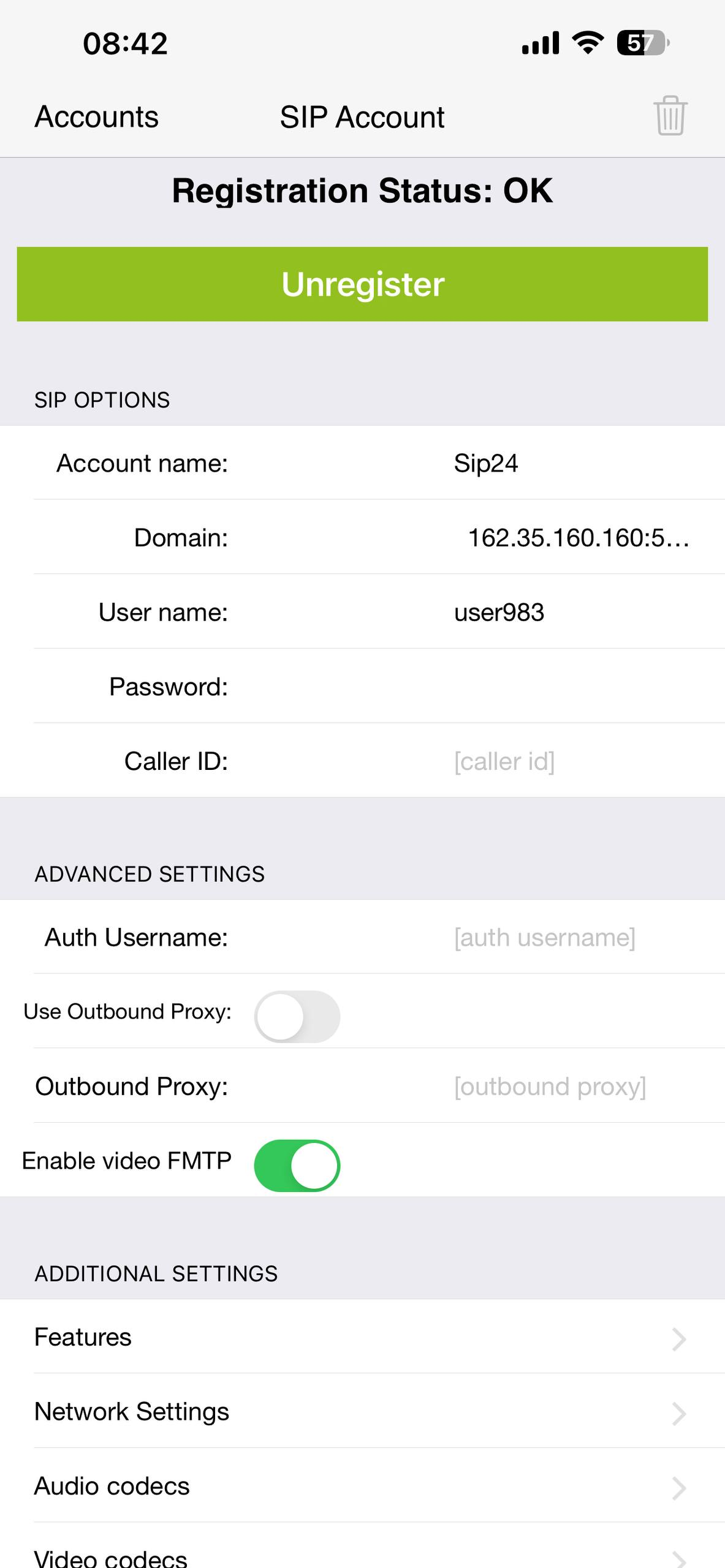
Step 3 — Add a New Account Manually Go to Accounts and tap the "+" button to add a new account. Zoiper will ask if you already have a SIP account — since you're a SIP24 user, select "Yes". On the next screen, skip the provider list and tap "Manual configuration" instead — this lets you enter your SIP24 credentials directly.


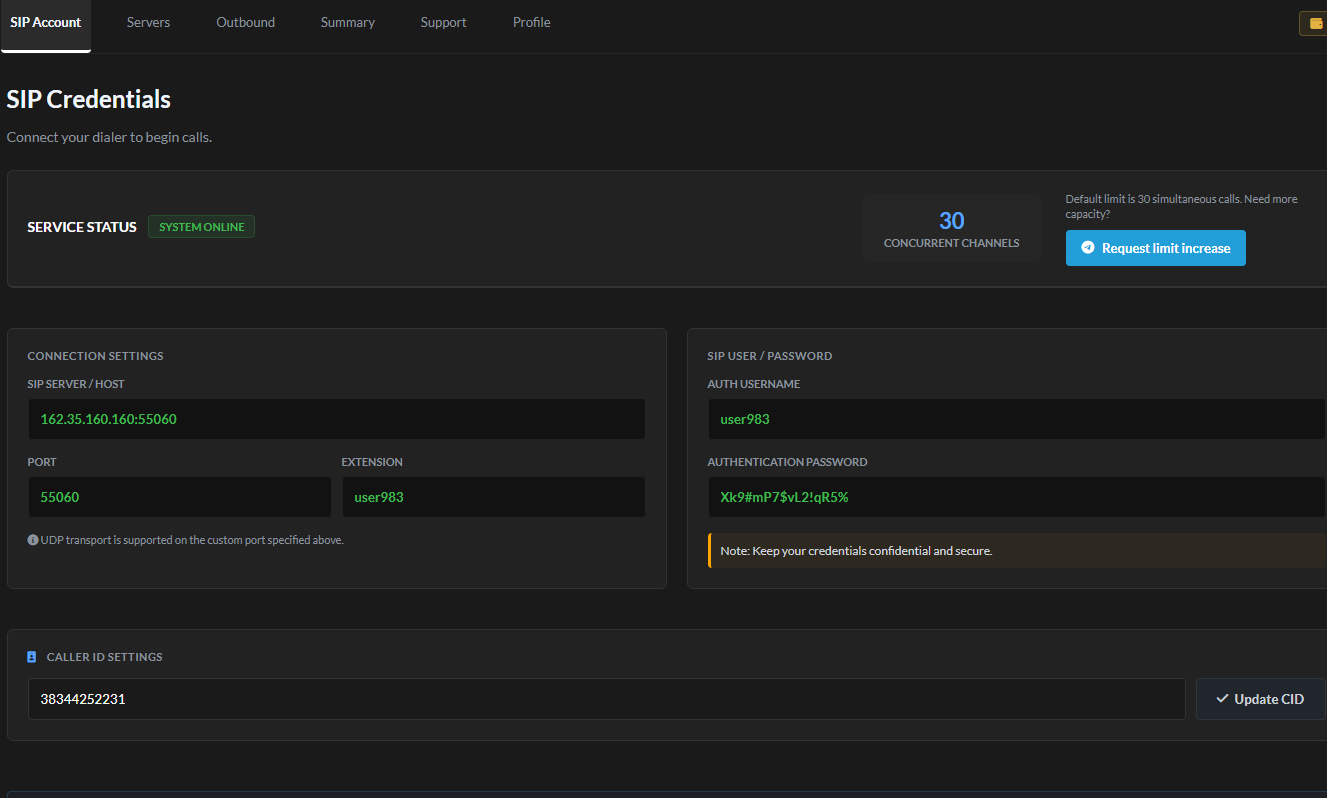
Step 4 — Enter Your SIP24 Credentials You'll now be asked for a SIP Username, SIP Password, and Domain. You'll find all three in your SIP24 dashboard under SIP Account — copy each value exactly as shown there. Also make sure SRTP encryption is toggled on before saving, so your calls stay encrypted.


Step 5 — Register and Test Copy your Username, Password, and Domain into the matching fields in Zoiper, then tap Register. If everything was entered correctly, the account status will change to "OK" — that means you're connected and ready to make calls. Dial the echo test command *43 to confirm audio is working in both directions.


Note on Caller ID: Zoiper doesn't have a built-in field for setting your CallerID. To change it, use the phone command *8080*<number> (do not confuse with 8088). After setting, a 603 Declined response confirms the caller ID is active. Dial *9000 anytime to verify your currently active caller ID.
Configuration Syntax & Phone Control Codes

The system supports built-in control codes for handling caller ID injection, active call audio, and local recording directly through your webphone or standard SIP client:

  • Caller ID Setup: Dial *8080*<number>. A 603 Declined response confirms the caller ID is set.
  • Verify Active Caller ID: Dial *9000.
  • In-Call Audio Playback: Dial *7002[number] to inject pre-recorded audio or intros into an active call.
  • Blind Transfer: Use ##[number] for transfer without holding (supported on webphone and standard SIP clients).
  • Local Recording: Dial *7301 to start and *7300 to stop local recording (client-side recording, nothing passes through our servers).
  • Secure Media: DTLS/SRTP is enabled by default (*7443 to verify).
Route Status & Platform Access

Active routes (optimized):

  • FR (France)
  • US (United States)
  • BE (Belgium)
  • BR (Brazil)
  • ES (Spain)
Germany (DE) Update: Custom caller ID selection is temporarily unavailable for Germany. Calls currently route via random German toll-free or business landline numbers while route engineering continues.
Accounts affected by recent optimization adjustments have been credited with 10 EUR.

  • Platform Access: Access your portal via sip24.cc.
  • Payments: Always request fresh payment details directly inside your user panel prior to funding. Do not use legacy payment info.
Still stuck? Remember that SIP24 support covers account, billing, and server-side issues only — we can't debug third-party app settings or device-specific quirks. If Zoiper still won't register after following every step above, double-check your balance and credentials first, then reach out via Telegram Support.
 
Top Bottom