





GarySpringfieldScammin’
Carding Novice
- Joined
- 07.11.26
- Messages
- 14
- Reaction score
- 0
- Points
- 1
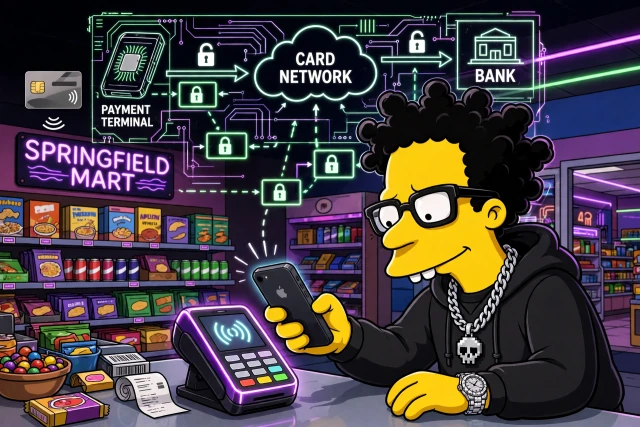
Lesson 7: POS Terminals & Payment Protocols
Part 1 of 2 — continued in the first reply below.
Moving the Same Purchase In-Store
Lessons 1 to 6 traced a purchase made online, where a fraud vendor scored the checkout before the bank saw it. This lesson takes the same $91.92 purchase, the same card, and the same iPhone into a physical store.
The money still follows authorisation, capture, then settlement and funding in one to three days. What changes is the first hop. There is no browser, no cookie, no IP address, no fraud score, and no 3-D Secure challenge. The terminal is the browser.
That changes what is proved and who bears the loss. A card declined online can often still work in-store, and the reverse is also true. Those are different gates, not one gate with different thresholds.
The terminal does not ask who you are in the way a website does. It asks the chip to prove itself, and it asks you to prove you hold the chip.
Architecture: Who Is in the Room
- Card or device: a physical chip card, or an iPhone or Apple Watch over NFC. The chip is a tiny computer.
- POS terminal: the card reader. It speaks EMV to the card, encrypts the PIN, and forwards a message. It is usually a certified, tamper-resistant device.
- Acquirer or processor: the merchant bank or its processor. It receives the terminal message and routes it onward.
- Card network: Visa, Mastercard, Amex, or Discover. It routes the message, enforces the rules, and runs clearing and settlement.
- Issuer: your bank. It makes the approve or decline decision and validates the cryptogram.
- Token Service Provider, or TSP: for Apple Pay, this is Visa Token Service, Mastercard Digital Enablement Service, or Amex Token Service. It maps the Device Account Number back to the real card number.
Online, a gateway and a fraud vendor sat between merchant and processor. In-store, that layer is mostly absent; the chip cryptogram does the heavy lifting.
Swipe, Dip, and Tap: Three Ways In
| Method | What Is Read | Freshness Proof | Weakness |
|---|---|---|---|
| Swipe | Static number and expiry | None, data never changes | Copied data can be cloned |
| Dip, EMV chip | Chip application | One-time cryptogram | Needs a chip reader |
| Tap, NFC | Same chip data, by radio | Same one-time cryptogram | Relay possible in principle |
Swipe: Static Data
The magnetic stripe holds static data: card number, expiry, and service code. Anyone who copies it can clone it. Verified from EMV history: this is why counterfeit-card fraud was an in-store problem before chip cards. Swipe still exists as a fallback, and that fallback is itself a signal to the issuer. The entry mode is recorded in the authorisation message.
Dip: The EMV Chip, Step by Step
The chip generates a one-time cryptogram, the ARQC, tied to amount, date, merchant, and a counter, the ATC, that increments every transaction.
- Terminal selects the payment application, using the AID, for example Visa or Mastercard.
- Terminal sends GET PROCESSING OPTIONS.
- Terminal sends READ RECORD.
- Terminal sends GENERATE AC, with data defined by CDOL1, including amount and an unpredictable number.
- Chip returns the ARQC, tag 9F26, plus the ATC and the CID.
- Terminal forwards the ARQC to the issuer, which validates it and returns the ARPC.
- Chip verifies the ARPC and returns TC for approved, or AAC for declined.
Most chip transactions in the United States go online to the issuer. Some low-value transactions can be approved offline by the chip itself, within floor limits set by the issuer. A terminal may also store-and-forward when its connection is down: approve now, send later. That is why offline limits are low.
Offline PIN is checked by the chip itself. Online PIN is encrypted with DUKPT, Derived Unique Key Per Transaction, and checked by the issuer. US credit cards usually run chip-and-signature or no cardholder verification method. Debit cards usually require a PIN.
Tap: The Same Chip, Over Radio
Tap is not a different security model. It is the same chip over NFC, ISO 14443, at about four centimetres, with the same flow: SELECT PPSE, using 2PAY.SYS.DDF01, then GET PROCESSING OPTIONS, READ RECORD, GENERATE AC, and the ARQC.
Contactless has a cardholder verification limit. Above it, the terminal asks for a PIN, or the transaction goes online. Limits vary by country, network, and merchant. There is no single universal figure, and this lesson does not state one.
Code:
SELECT PPSE 2PAY.SYS.DDF01
GET PROCESSING OPTIONS
READ RECORD
GENERATE AC with amount and unpredictable number
Chip returns ARQC tag 9F26 plus ATC plus CID
Issuer validates ARQC and returns ARPC
Chip returns TC approved or AAC declined
Apple Pay In-Store: The Token at a Terminal
What leaves the phone is the Device Account Number, or DPAN, plus a one-time dynamic cryptogram and a dynamic CVV, generated in the Secure Element from the token key, counter, and amount. The real card number never leaves the Secure Element.
The terminal forwards the DPAN and cryptogram to the processor, network, and TSP. The TSP validates the cryptogram, de-tokenises the DPAN to the real card number, and passes it to the issuer. The merchant never sees the real card number.
CDCVM, Consumer Device Cardholder Verification Method, is Face ID, Touch ID, or passcode on the phone, replacing the terminal PIN or signature. When the terminal supports CDCVM, you can tap above the normal contactless limit with no PIN and no signature. When it does not, it may still prompt for a PIN. That prompt is a terminal-configuration fact, not a decline.
In-store NFC Apple Pay does not go through Apple servers; the Secure Element talks directly to the terminal. The same card on an iPhone and on an Apple Watch has different DPANs, as does the same card on a second iPhone. The receipt last four will therefore differ from the physical card.
Trust Boundary: The Message That Actually Travels
Online, the checkout sent HTTPS and JSON to a gateway. In-store, the terminal and acquirer speak ISO 8583, the card industry message format.
| ISO 8583 Field | What It Carries | Why It Matters |
|---|---|---|
| Card number | Card number or DPAN | Identifies the account or token |
| Amount | Transaction amount | Bound into the cryptogram |
| Terminal and merchant ID | Which terminal and merchant | Locates the transaction |
| Entry mode | Chip, tap, swipe, or keyed | Decides liability after a dispute |
| Field 55 | ARQC, ATC, chip data | The proof the issuer validates |
| PIN block | Encrypted PIN | Encrypted before it leaves the terminal |
| Timestamps | Date and time | Ordering and replay checks |
The path is terminal to acquirer, to network, to issuer, and the answer returns the same way in about one to two seconds. Authorisation is still a hold, not money moving. Capture happens in the end-of-day batch, and settlement follows the same one-to-three-day pattern.
Authorisation is a hold. Capture is the batch. Settlement is the money moving. The terminal changes only the first step.
What the Terminal Knows, and What It Does Not
| Signal | Online Checkout | In-Store Terminal |
|---|---|---|
| Device fingerprint | Browser, canvas, fonts, TLS | The card or phone itself |
| IP and location | IP address and geolocation | Store location, no IP from you |
| Behavioural biometrics | Mouse and typing cadence | PIN timing, in principle only |
| Fraud vendor | Fraud score at checkout | Mostly none at the terminal |
| Identity graph | Email and account history | Card plus PIN or CDCVM |
| What proves it is you | Password and 3-D Secure | Cryptogram plus PIN, or Face ID |
Inferred: that is why a card declined online can often still work in-store, and vice versa. Online, fraud and browser signals can decline a transaction the issuer would have approved. In-store, the cryptogram proves card presence, with no browser signal to fail on.
Continued in the first reply below — Part 2 of 2.


